
Hiring across industries: why function matters more than sector
A VP of Sales moving from fintech to biotech is a normal hire. Why CanvasedIn searches by what people do first, and where they did it second.
CanvasedIn Team ·
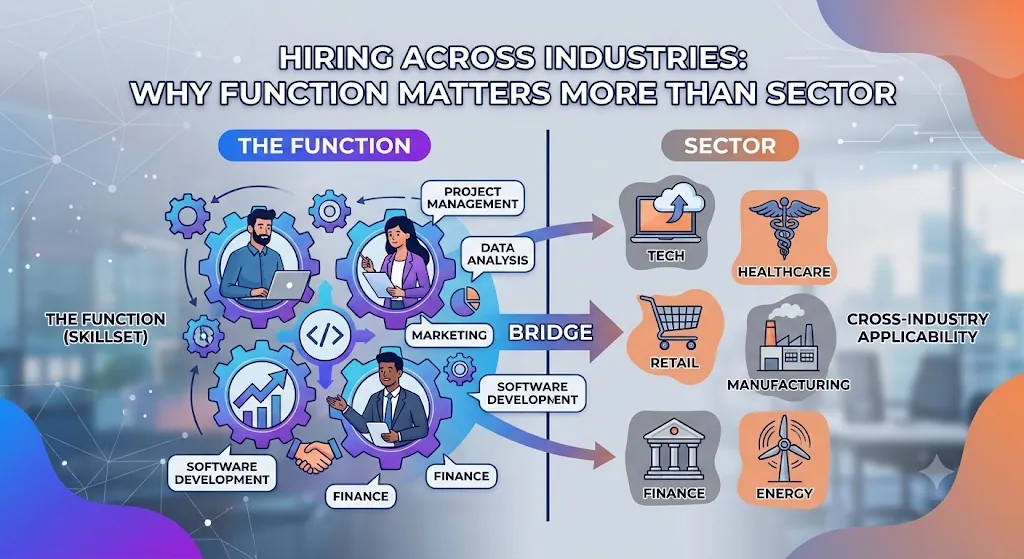
Imagine you're hiring a VP of Sales for a biotech company. One of the people you'd want to talk to has spent the last eight years selling fintech. They've built a team, carried a number, and sold to buyers who needed convincing. The product was different. The job wasn't.
Now imagine you search for “biotech”. That person doesn't show up. You'll never know you missed them, because the list looks fine without them.
We built CanvasedIn to avoid exactly that. Here's how it works, and what it changes when you search and when you write a request.
Two questions, not one tag
Most hiring tools put a single label on a person: a sector, a job title, or some mix of the two. We ask two separate questions instead.
What does this person do? That's their function. There are about 40, like Sales, Product Management, Supply Chain & Logistics or Finance & Accounting. Everyone picks one main function and can add a second.
Where have they done it? That's their industry. There are 19, from Pharmaceuticals & Biotech to Luxury & Premium Retail to Clean Tech & Energy Transition. Everyone picks between one and three.
Function first, and why
The two questions don't deserve equal weight.
If the function is wrong, the match is usually wrong. A Data Scientist role and a clinical research lead might both sit in pharma and still have almost nothing in common day to day. Skills, tools, seniority and how success gets measured all follow the function.
If the industry is different, the match is often fine, and sometimes that's the whole point. A clean-energy company hiring a supply chain lead out of automotive wants exactly that crossover. A VP of Sales moving from fintech to biotech is an ordinary hire.
So in CanvasedIn, a wrong function sinks a match however good everything else looks. A different industry only nudges the result up or down, and it never removes anyone unless you ask it to.
What you'll see when you search
Function is the first filter and industry comes second. You can also just describe the role in a sentence. CanvasedIn turns it into the same filters and shows them as chips, like “Function · Sales” or “Industry · Pharmaceuticals & Biotech”, so you can see what it understood.
Choose an industry and people from that industry move up the list. Everyone else stays. People from other industries get a small label on their card, either “Adjacent industry experience” or “Cross-industry perspective”, so you know where they're coming from.
If you really need one sector, tick “Only selected industries” under the industry filter. It's off by default, and that's on purpose. In a smaller pool, a strict sector filter can come back empty while the person you wanted is one row down, tagged with a neighbouring sector. We'd rather show you that person and let you decide.
What counts as a neighbouring industry
We drew those lines by hand. We didn't guess them from usage data. A few examples:
- Automotive & Future Mobility, Advanced Manufacturing & Automation and Clean Tech & Energy Transition sit next to each other.
- Luxury & Premium Retail sits next to Hospitality, Tourism & Travel and to FMCG & Consumer Goods.
- Financial Services & FinTech sits next to Investment Management and InsurTech & Risk.
- Pharmaceuticals & Biotech sits next to HealthTech & Digital Health.
Everything else counts as a cross-industry hire. It still shows up in your results. It just carries that label.
What changes when you send a request
When you set up a role template, you choose a function and an industry. There's also a switch called “Open to other industries”. It's on by default, because crossover is usually welcome. Switch it off only if the role really depends on sector knowledge, like knowing one regulatory regime inside out.
The professional sees how well your role fits them in plain words (Strong fit, Possible fit or Weak fit) with a short reason. Function matters most there too. If the role is in a different function from theirs, it can't rate better than Weak fit, however good the pay and the company are. A different industry lowers the fit a little and doesn't rule it out.
That makes function the setting to get right. It decides how your request reads to the person who receives it.
Three habits that help
- 1Describe the role by its function first. “A Head of Supply Chain” works. “A supply chain person from automotive” shuts people out before you've started.
- 2Leave crossover on unless you truly need sector experience. If you do, say why in the request.
- 3Read the labels, then open the Canvas. A label tells you where someone's experience sits. The work samples tell you what they did with it.
How many functions and industries are there?
About 40 functions in ten groups, and 19 industries in six groups. Each person has one main function (plus an optional second) and one to three industries.
Can I limit a search to one industry?
Yes. Pick the industry, then tick “Only selected industries”. It's off by default so crossover hires stay in view.
Does every Canvas have a function?
Yes. Nobody can make their Canvas visible until they've said what they do. Frontline profiles, for roles like ground crew or warehouse work, are searched separately, by credentials.
Hiring? Create a company account and start from the function.